
What do Claude connectors do for a business?
Claude connectors let you use supported external apps, records and actions inside Claude. The business benefit is not “more AI tools.” It is a clearer customer response, a useful answer from approved data, or a repeatable handoff that your staff no longer has to chase manually. The connector alone does not make an entire workflow reliable.
Imagine a service company whose inquiries arrive through email, customer details live in a CRM and appointments sit in a calendar. Someone still has to read the message, find the right record, check availability and decide what to do next. A well-designed Claude integration can help organize those steps; a human should still control sensitive or unverified actions.
Start with the result you want. “Help my team reply to new inquiries without missing details” is a better project brief than “install 15 MCP connectors.” The goal determines which apps are actually necessary.
Claude's official connectors and plugins directory is the place to check current listings. Individual integrations, plan availability and tools can change.
Five business problems worth solving before connecting another app
| Result the owner wants | Potential integration | What requires testing |
|---|---|---|
| Respond to leads sooner | Gmail + CRM context + approved draft | Correct customer match, consent, message approval and delivery status |
| Make appointment requests easier | Calendar availability + lead details | Time zone, slot rules, conflict checks and confirmed versus requested status |
| Find internal answers faster | Google Drive, Notion or Microsoft 365 search | Document permissions, freshness, source references and incorrect matches |
| Keep sales records current | HubSpot, Attio or Zoho CRM | Duplicate prevention, required fields, write access and audit trail |
| Reduce repetitive handoffs | Zapier or a custom MCP integration | Failure handling, retries, approval boundaries and human escalation |
These are possible workflows, not claims that a particular connector chain is installed, runs unattended or produces guaranteed bookings.
Claude connectors directory: official links, grouped by business goal
Use the direct links below to review the current connector description and supported tools. Start with the apps your business already pays for. A long list of connected accounts is not a business outcome.
Productivity and workspace
Business result: Find the information your team needs without searching five separate inboxes or folders.
- Google Drive — official Claude listing or help page: Search and read business documents and files, subject to permissions.
- Gmail — official Claude listing or help page: Find customer threads and prepare replies; sending requires permission.
- Google Calendar — official Claude listing or help page: Review availability and propose meeting times; only confirm bookings after testing.
- Microsoft 365 — official Claude listing or help page: Search work-account Outlook, SharePoint, OneDrive and Teams content.
- Notion — official Claude listing or help page: Find notes, decisions and work instructions in your workspace.
- Slack — official Claude listing or help page: Find team conversations and prepare operational updates.
- Asana — official Claude listing or help page: Track projects, deadlines and approved task updates.
- monday.com — official Claude listing or help page: Review team boards, project stages and assigned work.
- Trello — official Claude listing or help page: Review cards, boards and tasks or make permitted updates.
Design and content
Business result: Move from a brief to reviewable creative work while keeping branding and final approval in your hands.
- Canva — official Claude listing or help page: Work with designs and exports where the connected tools permit.
- Figma — official Claude listing or help page: Bring design context and components into development conversations.
- Gamma — official Claude listing or help page: Generate draft presentations and other marketing content for review.
Sales and CRM
Business result: Keep leads, meeting notes and follow-up tasks from getting lost across sales tools.
- HubSpot — official Claude listing or help page: Review or update customer and deal records within granted access.
- Attio — official Claude listing or help page: Look up contacts, notes, tasks and pipeline context.
- Zoho CRM — official Claude listing or help page: Explore approved contact, lead and deal workflows.
- Salesforce - Beta — official Claude listing or help page: Explore enterprise CRM context when beta eligibility and admin setup are in place.
- Clay — official Claude listing or help page: Research approved prospecting and account data before outreach.
Development, data and automation
Business result: Reduce manual handoffs between tools when access, API behavior and error handling are well defined.
- GitHub integration — official Claude listing or help page: Give Claude context from selected source repositories and files.
- Supabase — official Claude listing or help page: Work with permitted database and development tasks; restrict write actions.
- Zapier — official Claude listing or help page: Coordinate supported actions across connected apps using approved workflows.
- Atlassian Rovo — official Claude listing or help page: Search permitted Jira and Confluence tasks and documentation.
- Shopify — official Claude listing or help page: Review store orders, inventory and commerce data in supported accounts.
Finance and accounting
Business result: Get answers about cash flow and invoices with extra care around financial permissions.
- Intuit QuickBooks — official Claude listing or help page: Review financial information and permitted invoice tasks.
- Xero — official Claude listing or help page: Review accounting reports and invoice information; the listed Xero connector is read-only.
Need Linear, Close, Apollo, ZoomInfo or another system? Search the live Claude Marketplace rather than relying on an outdated list. A listing does not by itself prove that every feature is supported on your account.
How to connect Claude to your apps
- Pick one real problem. Example: reduce the time between a new web inquiry and an approved first response. Define who owns that process.
- Open the directory. In Claude, go to Customize → Connectors, discover the app, and inspect its description and requested access. Menus may differ by platform or plan.
- Authenticate with the correct business account. Review the app's access permissions and any organization-admin requirements. Don't share passwords in a chat.
- Enable the connector for your conversation. In a chat, use the plus menu → Connectors and turn on the service you need. Some tools are suggested automatically when connected.
- Test read-only first. Request an answer from a known, non-sensitive record and verify it against the source. Check how access restrictions behave.
- Approve writes separately. Before allowing a message to be sent, a deal stage changed or an appointment created, test rules, duplicates, failures, time zones and human review.
- Document the handoff. Record who maintains the connector, what it costs, what to do if it fails, and how to revoke access.
Anthropic provides an official setup and permissions guide. If Google Workspace is the main system, see the Google Workspace connector guidance.
Claude connectors vs. custom MCP integration: what should you buy?
A directory connector is usually the first choice when it already exposes exactly the records and actions your team needs. Model Context Protocol (MCP) is a standard for connecting AI applications with tools and data. A custom remote MCP server can make sense when your business needs a supported capability that no available connector provides or requires controlled access to a private service.
Custom integrations add real work: authentication, least-privilege scopes, input validation, data handling, logging, version changes and ongoing maintenance. A custom MCP server must also be reachable through a supported connection path; a local-only script cannot simply be pasted into Claude's web connector settings.
For many small businesses, a conventional approved automation or an existing connector is simpler than building an MCP server. The right answer depends on the job and systems—not on whether a tool is labeled “AI agent.”
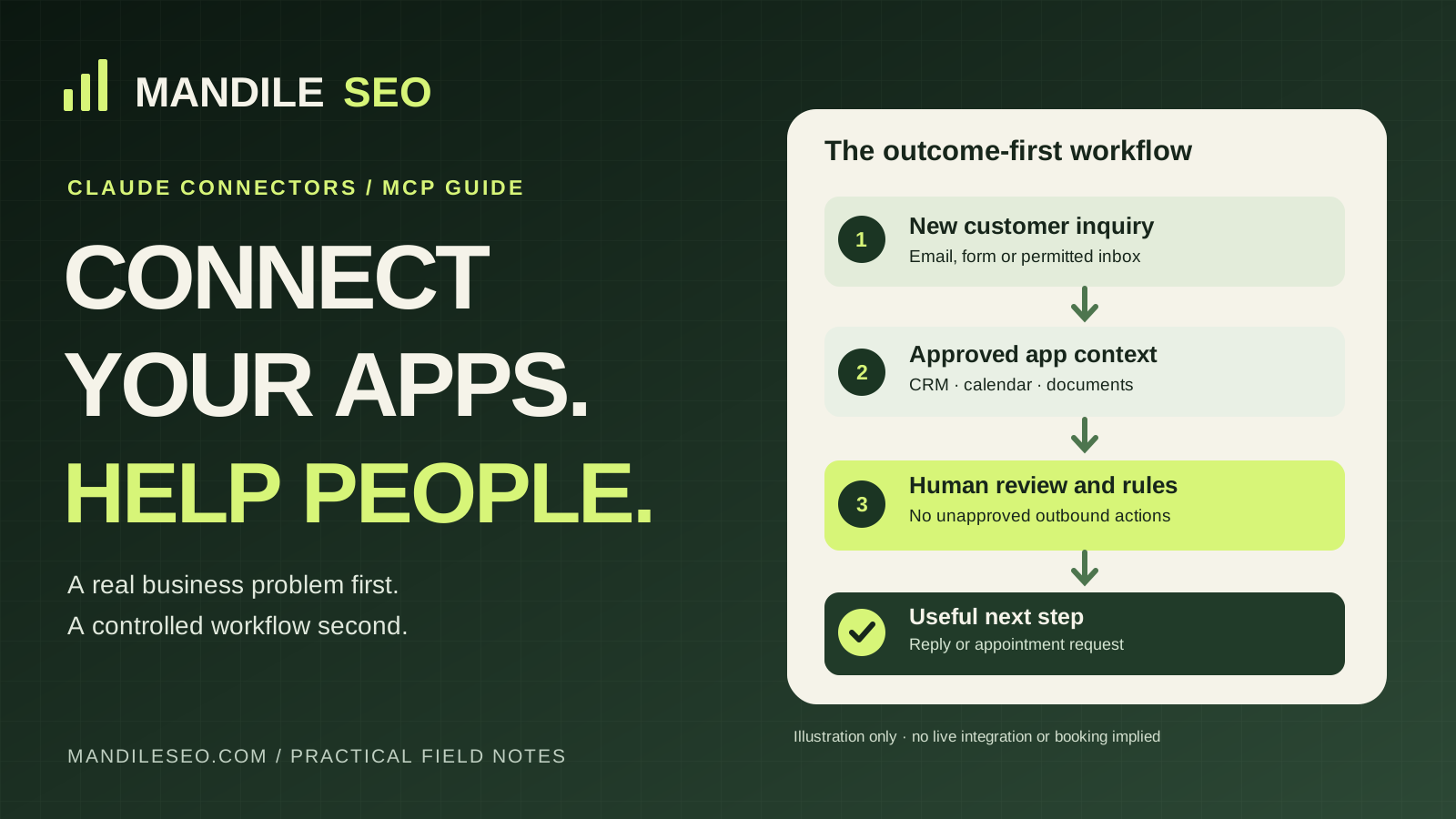
Example: help turn inquiries into appointment requests
Customer outcome: fewer new inquiries sit unanswered while the owner is busy. A prospective customer asks about a service and possible appointment times.
- An approved inbox or form provides the inquiry to the workflow.
- A permitted CRM lookup checks whether the contact already exists.
- An assistant proposes a reply using business-approved services, hours and policies.
- A person reviews the message or a separately approved policy determines what can be sent.
- If scheduling is in scope, the calendar integration checks real availability and confirms only after a successful booking action. Otherwise it records an appointment request for staff.
- The result and any failures are logged so a human can take over.
This is an illustrative architecture. A standard connector may not cover every step; implementation is based on the actual account permissions and tools. Neither an appointment nor a customer reply is real until the connected provider confirms it.
When does it make sense to hire someone for Claude connector setup?
If you want to connect Google Drive and search a document, you may be able to do it yourself. It becomes a scoped integration project when customer data lives in several systems, staff need dependable handoffs, or actions require strict approval rules. That is where technical setup, not another subscription, may provide the real value.
A responsible proposal should name the business result, the systems involved, account ownership, which actions are read-only versus write-enabled, what gets tested, what happens when a tool fails, and which provider fees are separate. It should not promise that Claude will automatically close deals, replace staff or book appointments without verified integrations.
Mandile SEO can help businesses in Glendale, Peoria, Phoenix and the Arizona West Valley, plus Salem, Keizer, Portland and other Oregon markets, scope these projects remotely. The work can include connector selection, permission planning, a limited pilot, tested automation and documented handoff—not a blanket install of every app.
Get customer inquiries moving. Connect only the tools you need.
Tell me which apps your team uses and where customer follow-up, appointment requests or internal handoffs break down. I can review the workflow and propose a scoped Claude connector or MCP integration plan. Compatible tools and any implementation fees are confirmed before work starts.
Independent implementation guidance, not legal advice. Claude and Anthropic names belong to Anthropic, and other app names belong to their respective owners. References are descriptive; no affiliation, sponsorship, or endorsement is implied. No guaranteed leads, appointments or software actions.
Claude connector setup: frequently asked questions
Can Claude connect to Gmail, Google Drive and Google Calendar?
Yes. Anthropic lists connectors for all three. Their available actions depend on account authentication, the connector tools and your permissions; an email draft is not the same as an email that has actually been sent.
What is the difference between a Claude connector and an MCP server?
A connector is the integration you enable in Claude. Model Context Protocol (MCP) is a standard that lets AI applications communicate with tools and data sources. Some listed connectors use MCP; a custom remote MCP server can expose a different approved workflow.
Do I need a developer to set up Claude connectors?
Not always. A supported connector with a standard sign-in can be straightforward to enable. Cross-app processes, custom MCP servers, permissions, consent, logging and exception handling are where scoped technical help can be useful.
Can Claude automatically book appointments or update my CRM?
Some connectors include calendar or CRM write actions, but nothing should be described as booked or updated until the relevant action succeeds. Business rules, compatible integrations, approvals and testing must be configured first.
Are Claude connectors free?
There is no single price for every integration. Plan limits, supported features, third-party software subscriptions, usage and custom implementation costs vary. Check the specific connector listing and provider terms before approving a project.
Can Mandile SEO set up Claude MCP integrations for my business?
Mandile SEO can scope connector setup, compatible API workflows and custom MCP integration work for a clearly defined business problem. We first review the apps, account ownership, permissions and acceptance tests, then provide a written proposal. We are an independent service provider, not Anthropic.
Related resources
- Claude AI integrations for realtors, IDX and MLS websites
- Do I need an AI agent for my small business?
- Questions to ask an AI agent developer before hiring
- Write a reviewable AI agent implementation brief
- AI automation and customer follow-up services
- Plan a bounded 30-day AI workflow pilot
Connector links and supported tools were checked against Anthropic's official directory and Help Center in October 2026. App vendors and permissions can change; recheck each listing before connecting.