
How can a Glendale business improve its Google Maps visibility?
Check that your Google Business Profile is eligible, accurate and complete. Choose the most accurate business category, keep hours and services updated, strengthen relevant website pages, earn genuine customer reviews and confirm your site can be indexed. Measure what changes. None of these steps guarantees a particular Google Maps position.
A roofer serving Glendale, a repair shop in Peoria and a medical spa in the West Valley may all need local visibility, but they do not have the same search intent, service area or customer questions. Effective local SEO in Glendale, AZ starts by describing the real business accurately, not by swapping city names into dozens of copied pages.
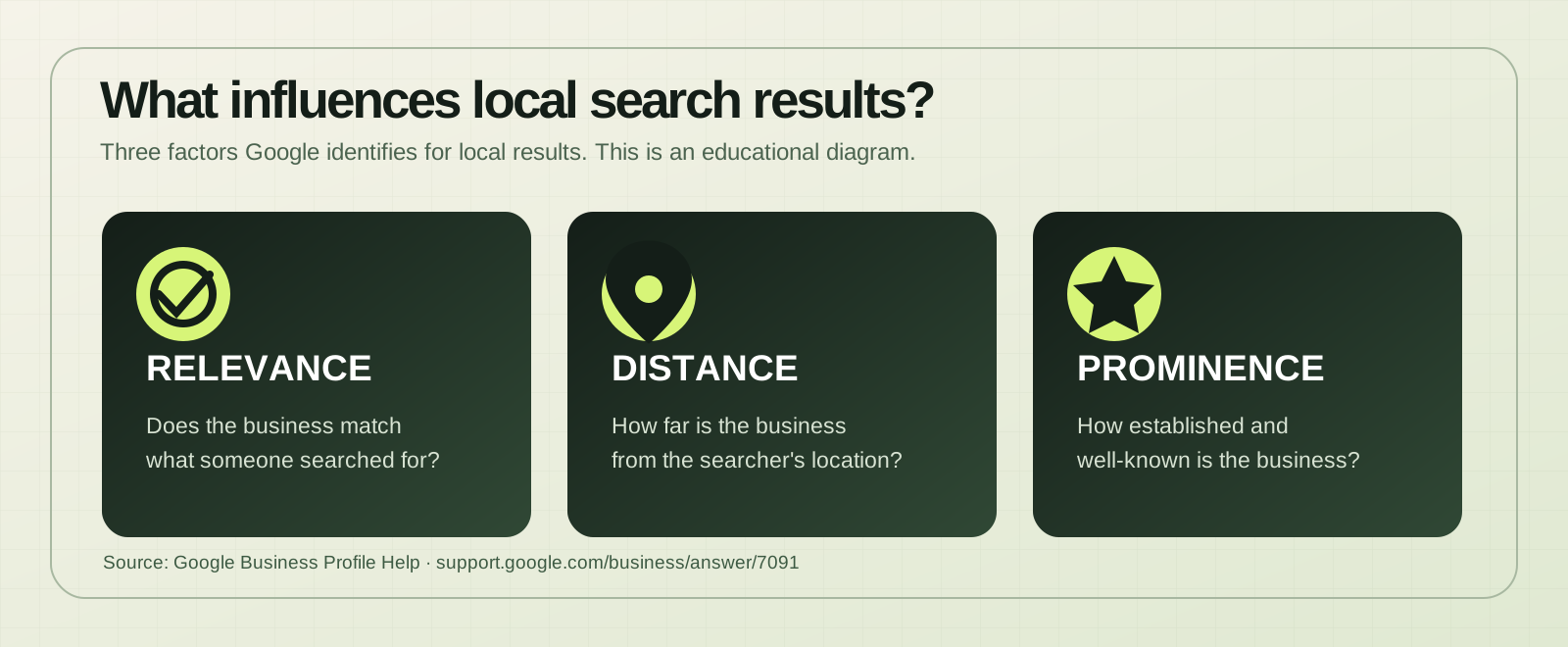
Google says local rankings depend primarily on relevance, distance and prominence. You can improve the information Google and customers see; you cannot purchase a better organic local ranking or control a searcher's location. See Google's local ranking guidance.
First: identify which problem you actually have
| What you notice | What to check first |
|---|---|
| Your business is missing even when you search its exact name. | Profile eligibility, verification/status, accurate business name and potential duplicates. |
| You appear for your name, but not for a service in Glendale. | Primary category, services, relevance of website pages, local competition and searcher distance. |
| You appear, but few people contact you. | Hours, reviews, service details, mobile website experience and how quickly inquiries reach a person. |
The 9-point Glendale local SEO checklist
1. Confirm your Google Business Profile is eligible and accurately represented
Use the real business name—the one customers recognize on signs, invoices and other business materials. Don't add “best Glendale SEO,” extra city keywords or service terms to the name solely to influence rankings. Confirm the location or service-area setup reflects where the business genuinely operates.
A virtual office is not a shortcut to a Glendale map listing. Google requires eligible businesses to meet its real-world customer-contact rules and has specific requirements for storefront and service-area businesses. Start with the Business Profile guidelines.
2. Choose the category that best describes your main service
Categories help Google understand what a business does. Pick the most specific accurate primary category, then add only genuinely applicable secondary categories. Don't pick a category because it appears to have more searches if it misrepresents your services.
For example, a real automotive detailing shop should describe detailing work rather than trying to rank under an unrelated auto repair category. Review the services attached to the correct category, too.
3. Complete your profile so customers can make a decision
Check opening hours, special holiday hours, phone number, website URL, business description, services, appropriate attributes and authentic photos. A contractor can show the type of work performed; a storefront can show the entrance and customer-facing environment.
Think like a first-time customer: can someone tell what you do, whether you serve their area and how to reach you without guessing?
4. Match your website to the services people actually search for
A Glendale company offering several profitable services often needs a clear page for each major service—not just a homepage mentioning “quality solutions.” Each page should explain the work, who it's for, real service limitations, useful answers and a contact path.
For example, a Phoenix-area HVAC business could explain what a diagnostic visit includes, what types of cooling systems it services and whether it offers scheduling in Glendale. Those details help both customers and search systems understand the offer.
For professional help with page planning, technical issues and Google Business Profile alignment, see Mandile SEO's local SEO and AI search services.
5. Make sure Google can crawl and index the right pages
A useful service page cannot attract Google Search traffic if it is blocked, incorrectly canonicalized or returns an error. Use Google Search Console to inspect the actual URL, check index status and look for unintended noindex instructions, broken internal links and redirects.
Make sure your mobile pages are readable, quick enough to use and easy to navigate. A site redesign is not always necessary; sometimes a crawl or linking fix is the better first investment. Google's Search Essentials explain the technical foundations.
6. Create genuinely useful location information—not doorway pages
Glendale, Peoria and Phoenix are connected markets, but a page that merely replaces one city name with another gives customers little new information. Describe actual operating locations, relevant services, customer logistics and the specific information people need.
For multiple real locations, keep each location's hours, phone or booking path and relevant services accurate. For a single service-area business, explain the verified areas served without creating imaginary offices or additional profiles.
7. Build a review process based on real customer experiences
Ask customers who actually used your service to leave an honest Google review. Make it easy with the profile's review link or QR code, respond professionally and take recurring complaints seriously.
Don't buy reviews, offer discounts in return for reviews, or filter requests so only happy customers receive them. Google explicitly prohibits review incentives. See Google's review guidance.
8. Improve local trust signals without buying junk links
Check that important business information is consistent on your own website and established third-party profiles. Where relevant, maintain accurate listings with professional associations, community organizations and directories that real customers use. Earn mentions by doing worthwhile work—not by purchasing hundreds of low-quality citations or links.
If you operate several legitimate locations, document who controls each Business Profile, which location facts need central approval and how changes will be measured. I've worked on SEO for franchise and multi-location owners operating seven- and ten-location groups; governance matters as much as keywords when multiple teams are involved.
9. Measure leads and improve your response path
Rankings alone don't tell you whether local SEO is helping. Review Google Search Console impressions and clicks by query and landing page. Pair those with available Business Profile interactions and your actual inquiries, calls and bookings. Track changes over time instead of judging one day's search result.
Then test the customer's next step. Is the phone number easy to tap? Does the contact form work? Does somebody know when a new lead arrives? A business can become more visible and still miss opportunities when responses are delayed.
What about AI SEO and Google AI Overviews in 2026?
AI-powered search is changing how people ask questions, but the foundation has not disappeared. Google's guidance says its AI experiences continue to rely on core Search systems. Useful original information, crawlable pages, accurate business facts and a strong customer experience remain important. There is no special AI schema or magic file that guarantees inclusion in an AI answer.
Write down answers your real buyers ask: which services are available, what happens after an inquiry, what equipment or problems you handle and what distinguishes your process. Keep these answers visible on your pages rather than hiding everything behind an interactive widget. Read Google's guidance for AI search features.
Where should a Glendale business start this week?
- Search your exact business name and make sure your real Business Profile is accurate and eligible.
- Review your primary category, services, hours, website link and recent customer photos.
- Open your most important service page on a phone and test the call or inquiry path.
- Check that page in Search Console and confirm it can be indexed.
- Record a baseline of queries, impressions, inquiries and Profile interactions before changing everything at once.
The goal is not to chase a universal ranking trick. It's to find the few specific problems keeping a genuine local customer from finding, understanding or contacting your business.
Glendale local SEO: common questions
Why isn't my business showing up on Google Maps in Glendale?
Possible reasons include an ineligible, incomplete or unverified profile; incorrect business category or details; competition; relevance; and the distance between your location and the searcher. Check exact-name visibility before diagnosing category rankings.
Can I pay Google to rank higher in the local map results?
No. Google says businesses can't request or pay for improved organic local rankings. Advertising is a separate paid placement and does not guarantee an organic map position.
Do I need a physical Glendale office to serve Glendale customers?
Not necessarily. An eligible service-area business may travel to customers in Glendale from its genuine operating location. Don't claim a staffed storefront or create a separate Google Business Profile for a place that doesn't qualify.
How long does local SEO take to work?
There isn't a reliable universal timeline. Indexing, competition, business history, profile accuracy and the size of the changes all matter. Establish a baseline and evaluate trends in visibility and qualified inquiries rather than promising a fixed date or ranking.
Does optimizing for AI search replace Google Maps SEO?
No. Business Profile accuracy, useful website pages and crawlability still matter. Clear answers and first-hand expertise can make content more useful to people and search systems, but AI citations and rankings are not guaranteed.
Want to know what to fix first?
I'm Jeremy Mandile, founder of Mandile SEO. I've worked in SEO since 2006, including local businesses and multi-location organizations. If your Glendale, Peoria or Phoenix-area business needs clearer Google visibility or a better path from search to inquiry, tell me what you're seeing. I'll review your request personally.